
Changelog
Updated October 8, 2026
October 2026
October 8
- Added GPT-6.1 Sol, OpenAI's newest balanced GPT-6 tier, with a 1.05M context window and always-on reasoning across five effort levels, at 1.2 credits per 1,000 tokens (2.03 above 272K context), the same base rate as GPT-6 Sol. Learn more
- Added Claude Haiku 5.5, Anthropic's newest and fastest Haiku model, with a 1M context window and toggle-able reasoning across five effort levels, at 0.06 credits per 1,000 tokens (0.3 above 100K context), 90% cheaper than Claude Haiku 4.5. It is available on the Free plan. Learn more
- Added Nano Banana 2.1, Google Gemini's newest image model for generation and editing at 1K, 2K, and 4K, from 10.08 credits an image (15.12 at 2K, 33.9 at 4K). Learn more
October 5
- Added 12 new connectors, bringing the total from 7 to 19: ClickUp, GitLab, Google Drive, Zapier, WordPress.com, Webflow, Wix, Kit, Klaviyo, Google Search Console, DataForSEO, and Fireflies.ai. The assistant can now search and read the tools you already use, directly in chat, and (with your approval) take actions in them. Every connector is available on the Free plan. Learn more
- Each connector's tools can be set to always allow, needs approval, or off. Actions that change your data need approval by default.
September 2026
September 29
- Added Claude Sonnet 5.5, Anthropic's newest Sonnet model with a 1M context window and toggle-able reasoning across five effort levels, at 1.2 credits per 1,000 tokens, the same as Claude Sonnet 5. Learn more
September 24
- Added GPT-6 Sol and GPT-6 Luna, OpenAI's balanced and fastest GPT-6 tiers, both with a 1.05M context window and toggle-able reasoning across six effort levels. Sol runs from 1.2 credits per 1,000 tokens and Luna from 0.06 credits per 1,000 tokensf, roughly 50% cheaper than GPT-5.6 Sol and GPT-5.6 Luna. Luna is available on the Free plan, which now includes 8 chat models: GPT-6 Luna, GPT-5 Mini, GPT-5 Nano, GPT-5.4 Nano, GPT-4o Mini, Gemini 2.5 Flash, Gemini 2.5 Flash Lite, and DeepSeek V4.1 Flash. Learn more
- Added Claude Opus 5.5, Anthropic's newest Opus model with a 1M context window and always-on reasoning across five effort levels, at 2.4 credits per 1,000 tokens, cheaper than Opus 5. It is built for long-horizon agentic coding and deep analysis. Learn more
- Added Grok 4.7, xAI's latest frontier model with a 500K context window and always-on reasoning across four effort levels, at 0.9 credits per 1,000 tokens (1.8 above 200K context). It is tuned for fast reasoning, real-time search, and agentic tool use.
September 14
- Added DeepSeek V4.1 Flash, DeepSeek's newest Flash model for faster, cheaper text and vision work, with a 1M token context window and toggle-able reasoning, from 0.08 credits per 1,000 tokens off-peak (0.16 during peak hours). It is available on the Free plan, which now includes 7 chat models: DeepSeek V4.1 Flash, GPT-4o Mini, GPT-5 Nano, GPT-5 Mini, GPT-5.4 Nano, Gemini 2.5 Flash Lite, and Gemini 2.5 Flash. Learn more
- Retired DeepSeek V4 Flash and DeepSeek V4 Flash Vision (Exp).
September 10
- Added GPT Image 2.5 Flare and GPT Image 2.5 Sunburst, OpenAI's newest image models for faster, higher-detail generation and editing, from 1.5 credits an image.Learn more
September 7
- Added GPT-6 Astra, Netus AI now supports OpenAI's latest frontier model with a 1.05M context window and always-on reasoning across five effort levels, built for the hardest coding, and analysis tasks where the answer has to be right. Learn more
September 3
- Added Gemini 3.8 Flash, Netus AI now supports Google Gemini's latest frontier model with a 1.05M context window, built for coding, agents, and document-heavy knowledge work, fast and cheap enough for high volume. Learn more
September 2
- Added Claude Fable 5.1, Netus AI now supports Anthropic's latest Fable model with a 1.05M context window, tuned for creative and long-form writing that keeps voice and style consistent across book-length context. Learn more
August 2026
August 27
- Added DeepSeek, three models on a 1M-token context window: V4 Pro, V4 Flash, and V4 Flash Vision (free to try). Same credit balance you already use.
- Added Kimi, Moonshot's K3 (1M context) and K2.6 for long-document and agentic work.
- Added MiniMax, eight models including M3 (1M context) plus M2.7/M2.5/M2.1 with Highspeed variants for low-latency chat.
August 18
- Generate images in chat, Turn on Create images in the composer, type a prompt, and get an image back like any other reply. Powered by GPT Image Mini, no mode switching required.
- Images Studio with 11 models, Pick your model (OpenAI, Google Gemini, or xAI Grok), size, quality, aspect ratio, and generate up to four images at once. Upload a reference photo or edit any image from your library, all from a single credit balance.
- Contextual image follow-up, After generating an image in chat, ask about it or build on it. On a vision-capable model your next message can see the image you just made, so you can request a caption, ask what's in it, or plan the next edit.
August 17
- Added Gemini 3.7 flash, Netus AI now supports Google's latest frontier model with a 1.05M context window, built for coding, agents, and document-heavy knowledge work, fast and cheap enough for high volume. Learn more
August 13
- Added Grok 4.6 (xAI), Netus AI now supports xAI's latest frontier model with a 500K context window, always-on reasoning, and #1 Databricks leaderboard ranking. Learn more
July 2026
July 30
- Context compaction for every model. Long conversations no longer hit a wall. As a chat context grows, older turns are automatically condensed so the discussion keeps flowing, across all models from all four providers, with the full context and quality of your conversation always preserved.
- Longer chats, lower cost. Because compaction runs automatically and is never billed to your credits, your longest conversations now cost you less.
July 27
- Three more models: Claude Opus 5, Gemini 3.6 Flash, and Gemini 3.5 Flash Lite.
- High-context support. Send much larger prompts to Grok 4.3, Grok 4.5, Gemini 2.5 Pro, Gemini 3.1 Pro, and OpenAI's long-context models (GPT-5.4, GPT-5.4 Pro, GPT-5.5, and the GPT-5.6 family), so big documents and long histories fit in a single request.
July 20
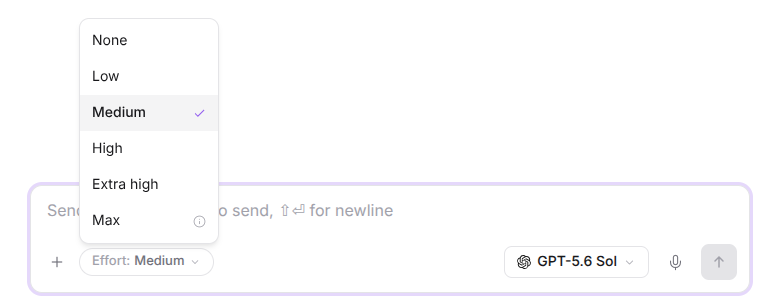
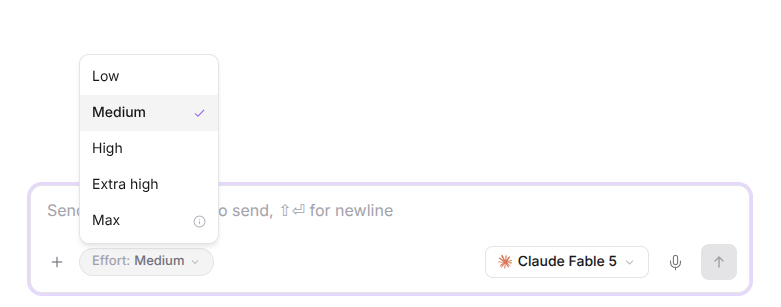
- Model-specific thinking modes. Thinking effort is no longer a fixed Low / Medium / High. Each model now exposes exactly the reasoning tiers it supports, from minimal all the way up to max, so you get the right depth for the model you choose.
July 17
- Prompt caching, where providers support it. Repeated context (system prompt, tools, long documents) is now cached instead of re-processed, so replies are faster and you save a lot of credits on every follow-up turn. Active on all Claude models, OpenAI GPT-5.4 and newer, and Grok 4.3, with Gemini caching automatically behind the scenes. The savings go straight to you, and billing is never worse than before.
July 14
- Connect your tools with connectors. Link external tools straight into your chats through MCP, starting with seven connectors. Grant access per tool and approve sensitive actions inline.
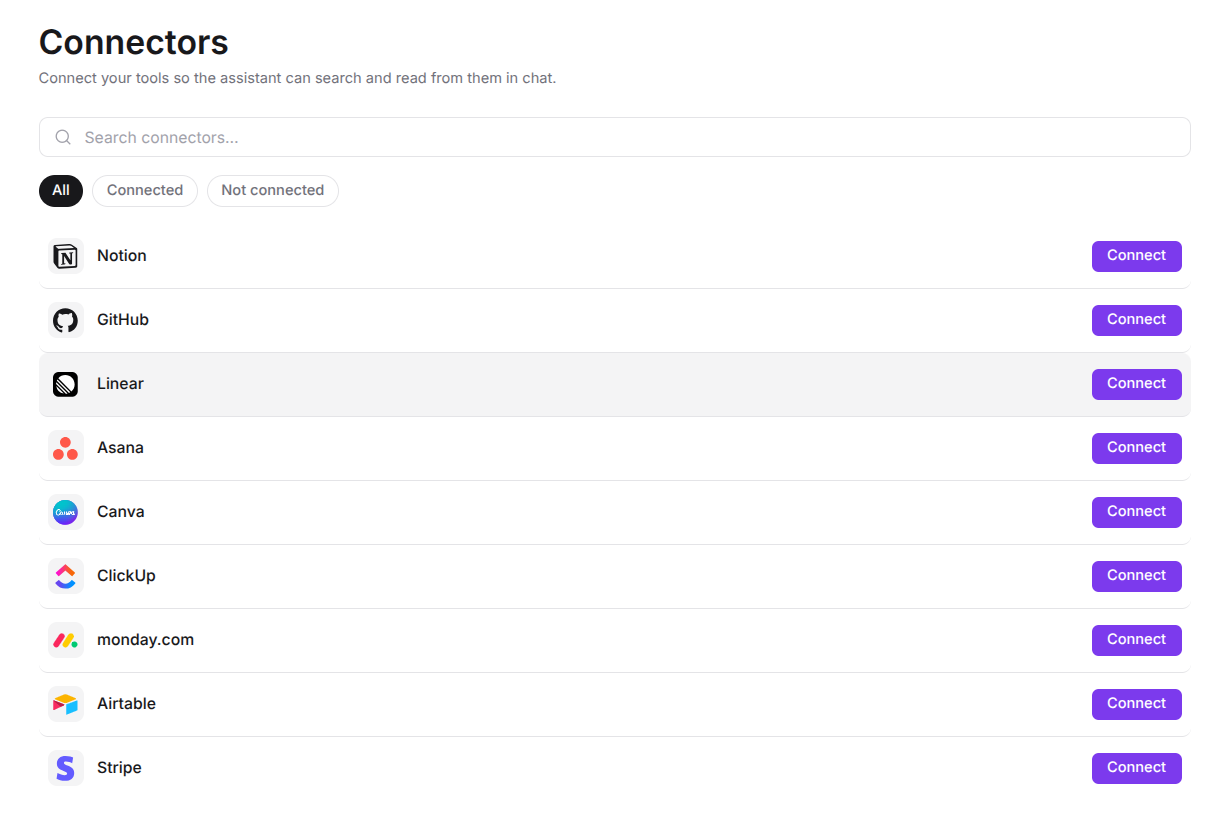
- You are always in control. Every tool has its own permission: allow, ask, or never. Read-only tools run freely, and any action that writes or changes something asks for your approval right in the chat before it happens.
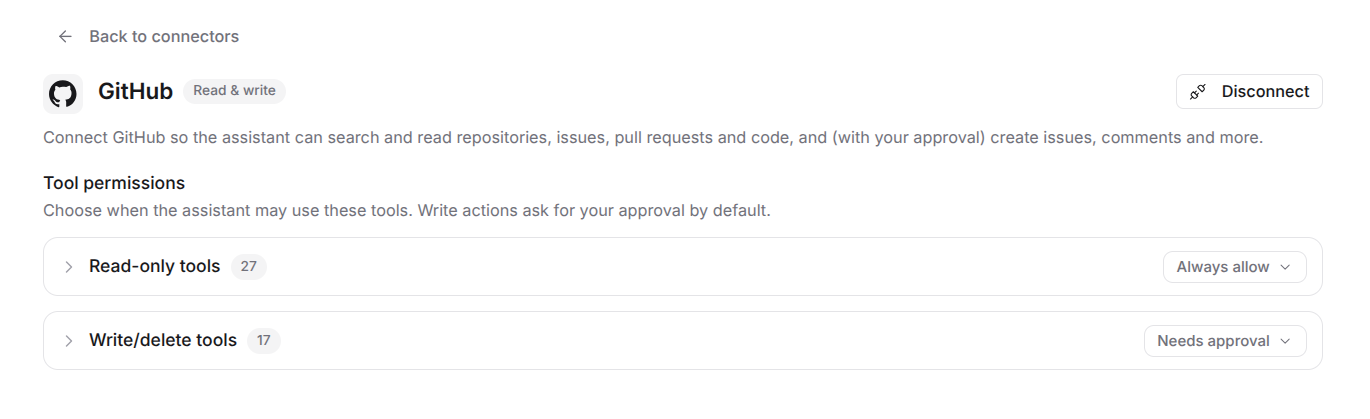
- Nothing runs without your say-so. Set a connector to read-only, tune permissions tool by tool, or block a tool entirely. Write actions pause and wait for you to approve them once, always, or decline.
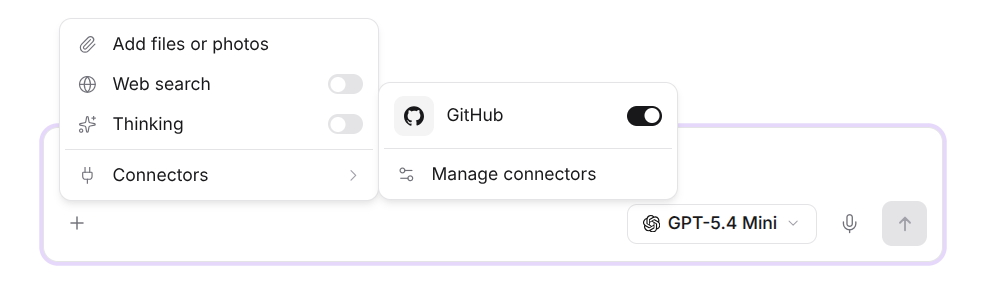
- Your credentials stay yours. You connect through the provider's own secure login, so NetusAI never sees your password. Access is encrypted at rest, and you can disconnect any connector at any time to revoke access instantly.
- Built for teams. Owners and admins choose which connectors an organization can use, and owners can enforce a read-only ceiling so no member can trigger write actions.

July 13
- The GPT-5.6 family lands. Three new OpenAI models, Luna, Terra, and Sol, spanning cost-efficient to flagship performance.
July 3
- Say hello to xAI. Grok joins the lineup as our fourth provider, alongside Claude, Gemini, and OpenAI.
- Three new models: Claude Sonnet 5, Claude Fable 5, and Grok 4.3.
July 2
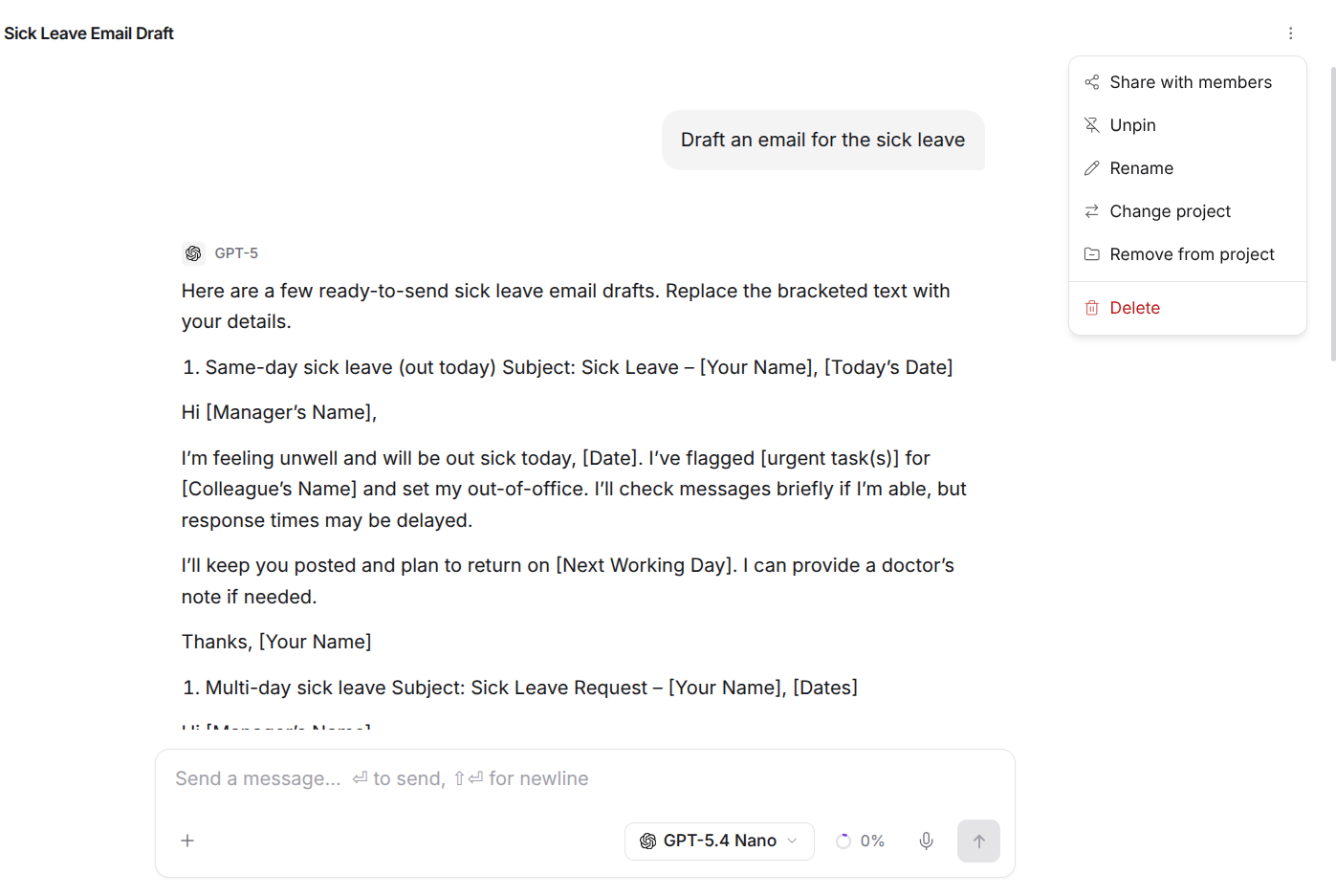
- Share a chat. Chats in a project are private to whoever started them by default, even when other members join the project. When you want input, share any conversation with your project members so the whole team stays on the same page. Nothing you create is visible to others until you choose to share it.
July 1
- Move chats in and out of projects. Reorganize freely by moving any conversation into a project or back out to your personal space.
- New "Recent" filter. Jump back to what you were working on with a filter that surfaces your most recent chats first.
June 2026
June 26
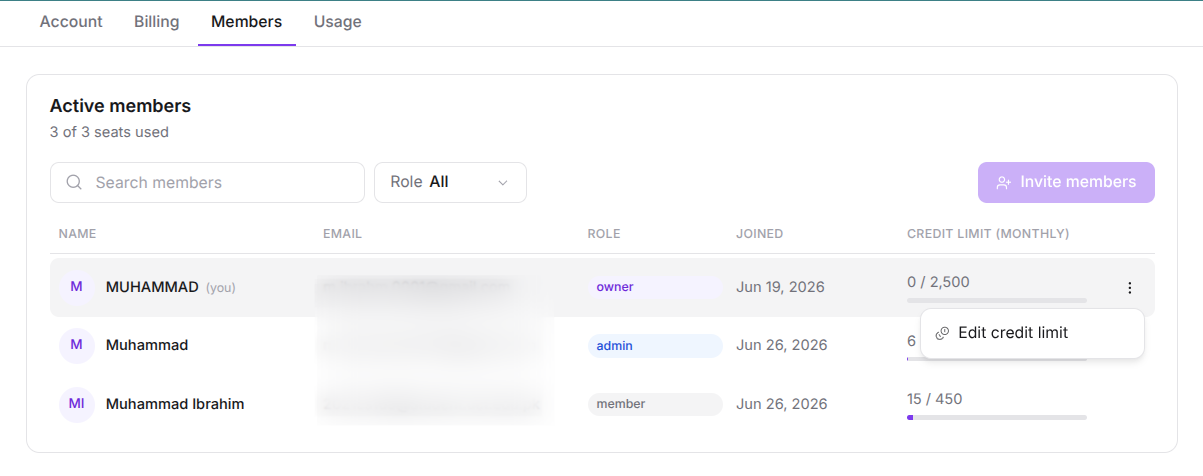
- Per-member credit limits for organizations. Owners and admins can now cap how many credits each member uses over a rolling 30-day window, keeping team spend predictable. Members are notified when they reach their limit.
June 24
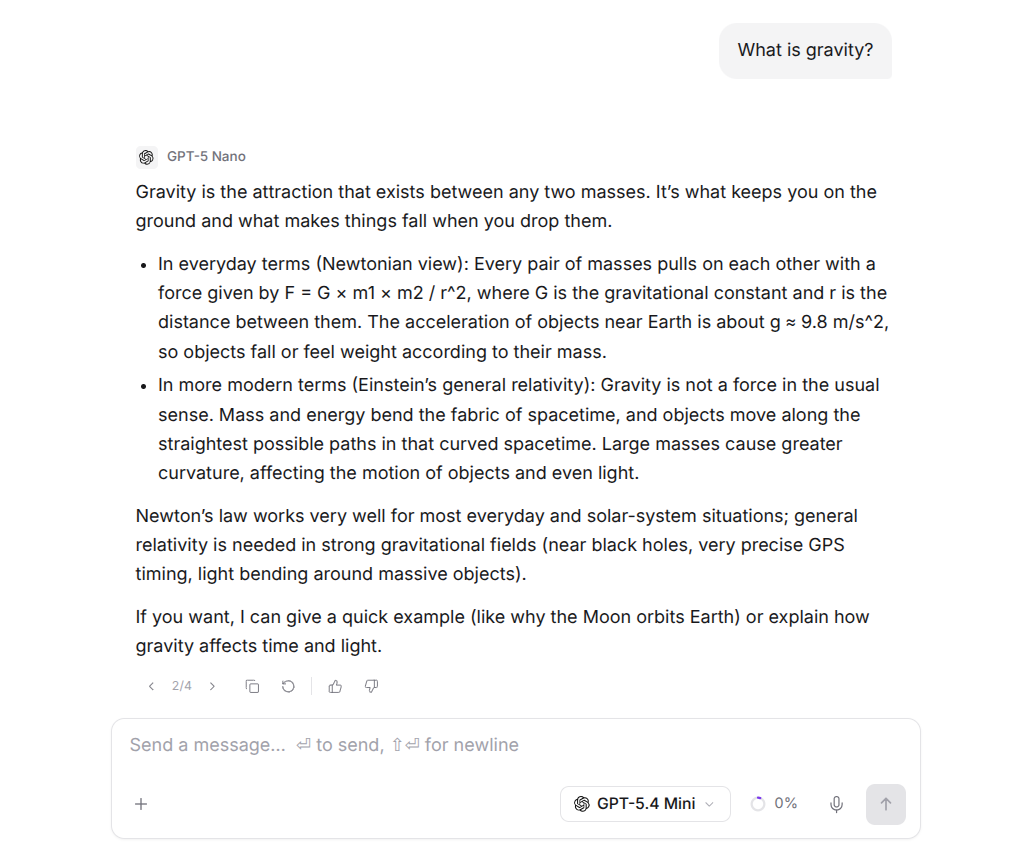
- Regenerate any response. Not happy with an answer? Regenerate it in a single click.
- Conversation branching. Regenerating or editing a message now creates a branch instead of overwriting it, so you can explore different directions and move between versions with the ‹ › navigation. Nothing is ever lost.
- Pin your chats. Pin and unpin conversations to keep the ones that matter at the top of your list.
June 23
- NetusAI Chat is here. Chat with the latest models from Claude, Gemini, and OpenAI in one place, with streaming responses, thinking modes, and built-in web search. Group conversations into projects, add knowledge sources for grounded answers, and switch models mid-conversation without losing your place.